

Concepts
Introduction
If you have a couple of VMs to look after (a cheap VPS, a home lab, a Raspberry Pi), you probably know the drill: remote copy files over, SSH in, restart a process, tail logs, then do it again on the next VM.
The other thing you usually want is predictability: the same deploy steps every time, with the same runtime version, without relying on “whatever happens to be installed” on a box.
Docker can solve some of that, but it can also be overkill for simple projects. Not every project needs a container - sometimes you just want to run a simple Node.js, PHP, Java, or Python app directly on the VM. For those cases, Dployr gives you a programmable deployment workflow (blueprints) for VMs. Docker amongst other runtimes e.g Node.js, PHP, Java, Python etc. is supported, but it is treated as one runtime option, not a requirement.
The model is:
- Base is the globally distributed control plane.
- Each VM runs
dployrd(a lightweight daemon) that establishes an outbound connection to Base. - Web and the CLI talk to Base, which relays the requests to the appropriate VM.
When you make a deployment, open a console, stream logs, or perform any other action, the request goes to the Base, then down to the right VM through the same long-lived WebSocket connection.
Architecture
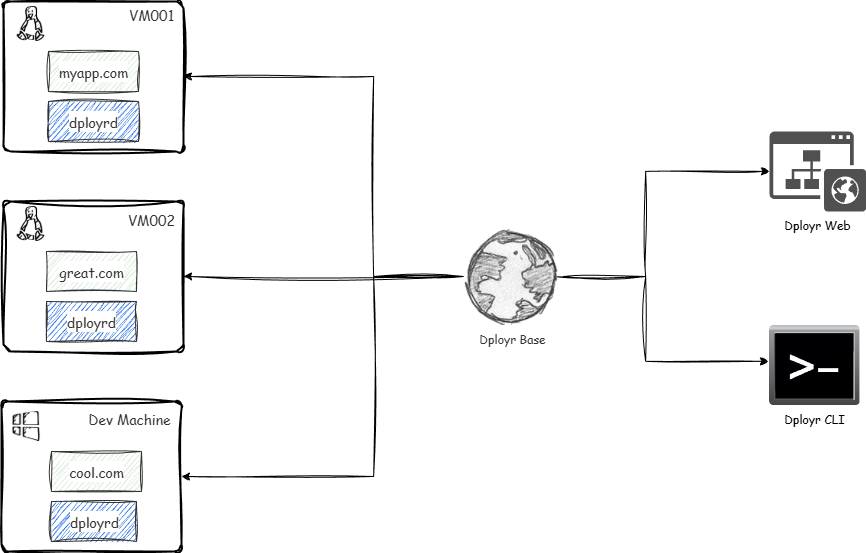 Dployr maintains a persistent mTLS WebSocket connection between the agent and the base.
Core components
Base
Base is the globally distributed control plane. Web and the CLI talk to Base, and Base routes those requests to the right VM through dployrd.
- It exposes the API used by Web and the CLI.
- It handles authentication and authorization (RBAC) and records actions.
- It schedules work and keeps state for projects, VMs, deployments, and services.
You can use the hosted base (run by dployr), or self-host the base yourself using dployr-base. Either way, each VM only needs an outbound connection to Base.
Agent (dployrd)
dployrd is a lightweight daemon that runs on your VM.
- It maintains a long-lived, outbound WebSocket connection to Base (mTLS).
- It receives requests from Base (deploy, restart, run commands) and executes them locally.
- It streams logs and status back to Base.
Web
The Web UI is available at app.dployr.io (source: dployr). It talks to Base.
CLI
The CLI follows the same pattern as Web - it talks to Base.
Synchronization (how base and VMs talk)
Dployr is designed so your VMs do not need to accept inbound traffic from the internet.
- Each
dployrdagent generates a client certificate. - The base uses that certificate to authenticate the agent (mTLS).
- The agent keeps a persistent connection and reconnects automatically.
- Work is pushed over that connection in real time.
That same connection is also what makes the “debug from one place” features possible:
- Console: interactive shell sessions are tunneled from Web to the VM through the base and
dployrd. - Logs: logs are streamed over WebSocket rather than scraped or polled.
Authentication and tokens
Bootstrap token
Used once when registering a new agent.
Access token
Short-lived token used for API calls. The agent refreshes it automatically every 5 minutes.
Logging
dployrd writes structured JSON logs to /var/log/dployrd/app.log for debugging.
Deployments
Deployments describe what to run on a VM and how to run it.
You can create deployments in two ways:
- A guided form (good for getting started)
- A blueprint (good for repeatable, reviewable, version-controlled setups). See Blueprints.
Services
Services are long-running processes managed by dployr.
- Restart on failure
- Environment variables
- Port management
- Log collection
Proxy
Dployr uses Caddy as a reverse proxy in front of services.
Runtimes
Dployr manages language runtimes using vfox, enabling consistent installation and switching across VMs. Supported runtimes include Node.js, Python, Go, PHP, Ruby, .NET, Java, Docker, and Static.
Security model
mTLS
All agent-to-base traffic is encrypted and mutually authenticated.
RBAC
Permissions are scoped by role, and actions are recorded. This is what makes audit-friendly workflows possible in teams.